Every cap at a glance
| Cap | Limit per LinkedIn account |
|---|---|
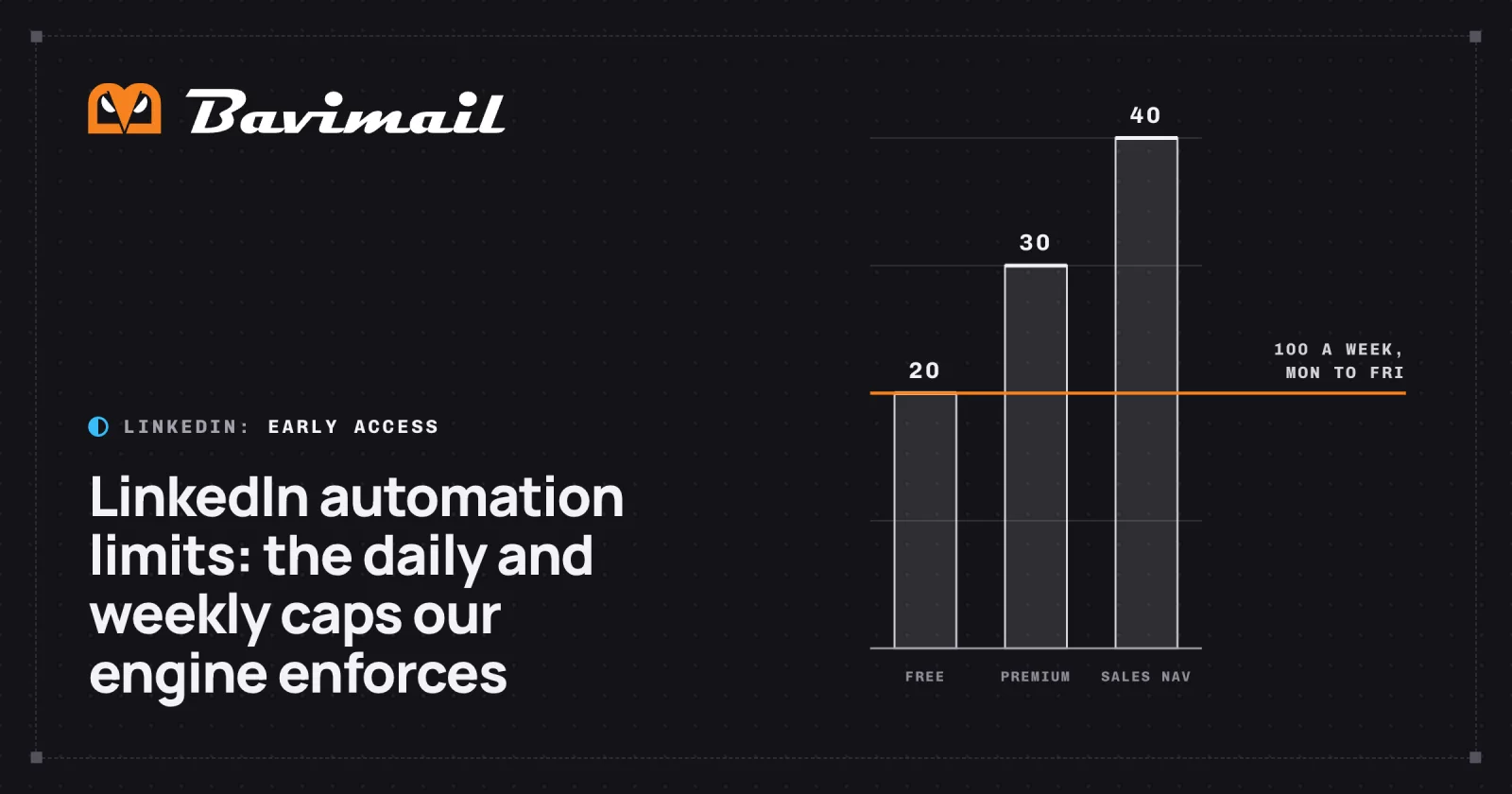
| Connection requests a day | 20 on a free account, 30 on Premium, 40 on Sales Navigator |
| Connection requests per rolling 7 days | 100 by default |
| Messages a day | 100 by default |
| Warm-up for a new account | 3 connection requests and 20 messages a day at first, rising to the full limit over 14 days |
| Sending sessions | 2 to 5 a day, 12 to 25 minutes each |
| Bulk profile lookups | 20 of the account's 60 a day, one at a time |
| LinkedIn searches | 50 a day, 10 an hour |
Connection requests
The daily allowance is the lower of the daily cap and the weekly cap divided by the days the account's campaigns send. At 100 a week, an account that sends Monday to Friday gets 20 a day. One that sends all 7 days gets 14.
- Monday to Friday: 20
- Every day: 14
- Free20
- Premium30
- Sales Navigator40
Source: Caps enforced by Bavlio's outreach engine in production, checked October 14, 2026.
You can set a lower daily or weekly cap on any account, and each campaign can carry its own lower daily limit.
Messages, warm‑up, pacing and lookups
Messages. They go to people already connected to the account: after they accept a connection request, or to existing connections.
Warm-up. A newly connected account ramps up in a straight line from its starting limits to its full limits. You can set the warm-up from 0 to 30 days.
Pacing. A campaign doesn't send its day's allowance at once. Its sessions are 45 to 120 minutes apart, inside its sending window.
Profile lookups. The engine looks each person up right before their invitation. Bulk lookups, such as finding new leads for a campaign, run one at a time, 3 to 8 seconds apart.
Replies and opt-outs
- A reply takes the person out of the sequence. No further steps send.
- A reply that asks to stop puts the person on the suppression list. Nobody on it gets another message on any channel.
What LinkedIn says
LinkedIn's User Agreement prohibits using "bots or other unauthorized automated methods to access the Services, add or download contacts, send or redirect messages". Any tool that sends from a member account carries a risk of restriction, ours included. The caps above are how we keep each account's volume low.
For what an agent can do under these caps, see LinkedIn API for AI agents and LinkedIn MCP server.